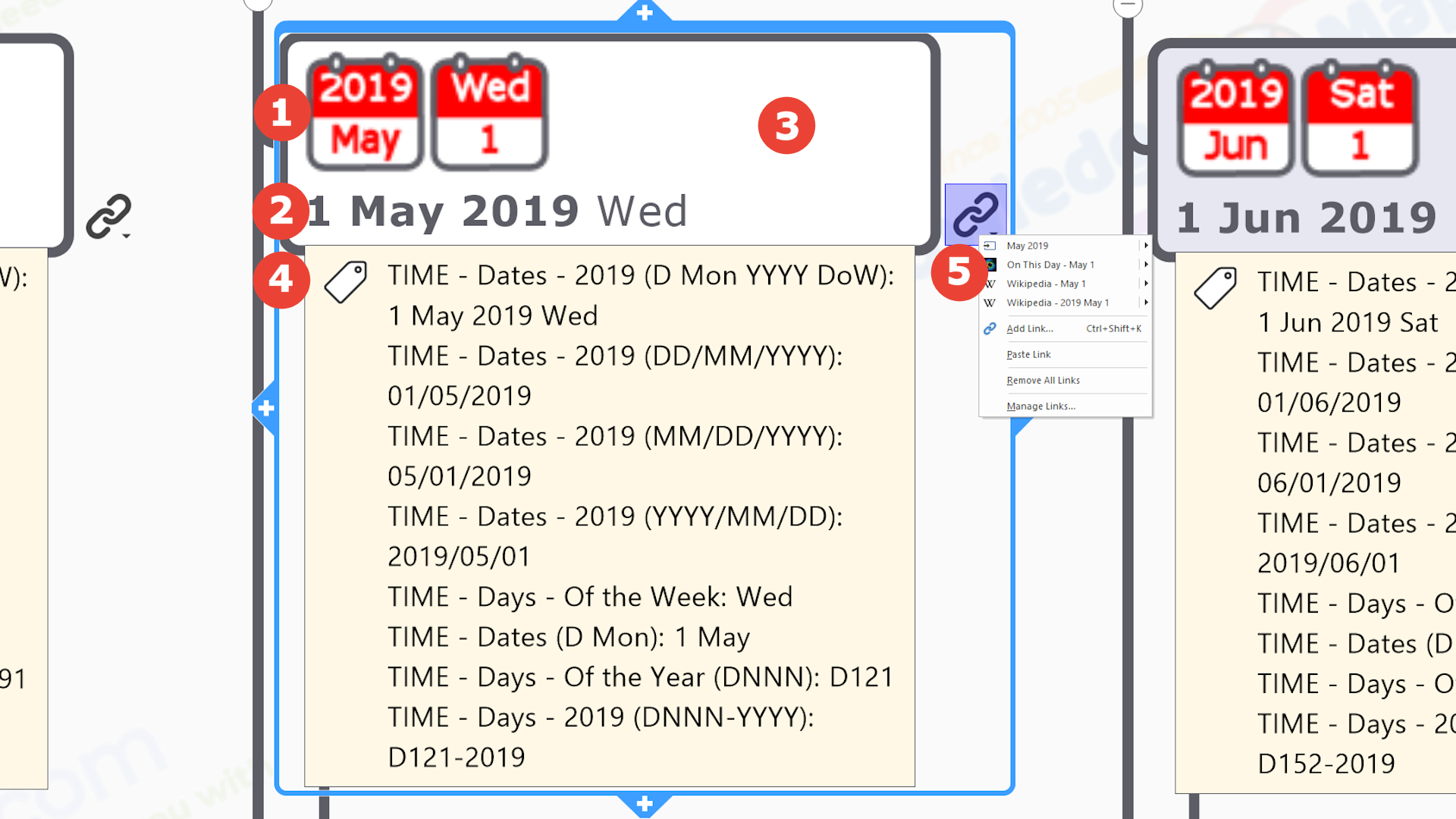
Specific Day of the Specific Year Seed Branch
MindManager provides an unparalleled range of ‘information cartography’ functionality that enables contextual knowledge to be embedded and attached to map branches in multiple ways…
.

 Image: Specific Date Icon
A bespoke icon that uniquely identifies the specific day of the year using a double calendar image. The left hand calendar contains the specific year above the name of the month (abbreviated to the first 3 letters), whilst the right hand one contains the day of the week (abbreviated to the first 3 letters) above the numerical day of the month (so from 1 to 31).
Note(s)
i) The icon was originally designed and created by us as a 96 x 48 pixel PNG file, optimised to minimize the file size (typically 2-3 KB).
.

 Text: Specific Date
Richly formatted text string of the specific date (year, month & day of the month) and day of the week in the format eg. ‘1 Jan 2020 Wed’. The day of the week is in normal (as opposed to bold) font, and moved to the line below, to improve ‘readbility’.
.

 Branch Shading Colour: ‘Type’ of Day
Day branches are shaded according to the usual differentiation between days of the week – working days (mon-fri by default), and weekends (sat & sun by default).
Note(s)
i) Branch shading is controlled by a Smart Rule (a unique MindManager feature) triggered by the ‘TIME – Days of the week’ index marker tag – ‘Weekend Days’ are set to be topics tagged as ‘Sat’ and ‘Sun’ by default. MindManager users can easily change this rule to set weekends as any days of the week they want (and add further rules as required eg. adding their own public holidays, leave days etc.).
.

 Index Marker Tags & Groups: Various
Arranged in groups and attached to branches as required, index marker tags…
- provide additional contextual knowledge about the seed branch, visiable to all users.
- enable dynamic filtering of the map content to only show / hide branches that have been tagged with the selected marker
.
As this is a Calendar map, unsurprisingly all the tags in it are TIME tags, covering different time intervals – years, quarters, months, weeks, & days (see notes below). Other than the time interval covered, there are 2 main differences between the different tag groups….
- Calendar Year (YYYY) or Business Year (YYYY/YY) – The ‘Calendar Year‘ of this map is straightforward (eg. 2024), however organisations – be they commercial, charity, community group etc. – usually organise their affairs by their ‘Business / Financial Year‘, which usually straddles Calendar Years. For example the 2024/25 personal tax year in the UK runs from April 2024 to March 2025, though an organisation’s ‘Business Year’ can actually start on any month of a calendar year (giving 12 possible ‘Business Years’). Thus we created marker groups covering both type of year, those suffixed by ‘- YYYY’ (eg. ‘- 2024’) are for a Calendar Year, whilst those suffixed by ‘- YYYY/YY’ (eg. ‘- 2024/25’) are for a Business Year.
. - Already attached to a branch or not – Not all of the marker groups in this map are ‘in use’ ie. already attached to a branch. This is for either or both of the following 2 reasons….
1) It’s for a business year (YYYY/YY) – Given the subjectivity of these as just discussed, only the map user knows which ones they would apply to which branches in the calendar year, so any Business Year tags (those that include ‘YYYY/YY’ in their name) are not pre-attached to any map branches.
2) It’s for a ‘Sub-Annual’ time interval not currently represented by a map branch – As previously noted one of the additional purposes of our Calendar Maps is to be a comprehensive source of time-related content for MindManager users. Thus when creating the tags to attach to the Month and Day branches that make up the main framework of any annual calendar, we also created tag groups for time intervals that may be useful to some users when working with annual calendars. For example entities who use ‘Business Years’ usually further subdivide them into ‘annual quarters‘ (eg. ‘Quarter 1 of 2024/25’) and ‘annual weeks‘ (eg. ‘Week 25 of 2024/25’). For the same subjectivity reasons that we cannot assign Business Year tags to branches, we cannot physically sub-divide our calendar maps with Quarter or Week branches. Users may want to create their own additional branches for them and restructure their calendar accordingly.
Note that tags that have not been assigned to a map branch will not be visible in the tag list in the exported HTML version of the map.
.
DATE TAGS
The following tags relate to the time interval of Calendar Dates, the subject nature of this ‘specific day of the specific month of the specific year’ seed branch…
 TIME – DATES (D Mmm) – GEN – Every generic date of the month, for each of the 12 months of the generic Gregorian Calendar year as abbreviated text and number – 365 tags from ‘Jan 1’ to ‘Dec 31’.
TIME – DATES (D Mon YYYY DoW) – YYYY – Every date of the specific year in the same format as the day branch text – 365 tags from eg. ‘1 Jan 2024 Tue’ to ’31 Dec 2024 Tue’.
TIME – DATES (DD/MM/YYYY) – YYYY – Every date of the specific month, for each of the 12 months of the Gregorian Calendar year in the most commonly used numeric format – 365 tags from eg. ’01/01/2019′ to ’31/12/2019′.
TIME – DATES (MM/DD/YYYY) – YYYY – Every date of the specific month, for each of the 12 months of the Gregorian Calendar year in ‘Amercan’ style numeric format (ie. months first) – 365 tags from eg. ’01/01/2019′ to ’12/31/2019′.
TIME – DATES (YYYY/MM/DD) – YYYY – Every date of the specific month, for each of the 12 months of the Gregorian Calendar year in ‘year first’ numeric format – 365 tags from eg. ’01/01/2019′ to ’31/12/2019′.
Note(s)
i) This format is the only one in which the chronological order of the tags in the group will ‘survive’ a numeric sorting operation (ie. arrange ‘lowest to highest’ or ‘highest to lowest’).
DAY TAGS
The following tags relate to the time interval of Calendar Dates, the subject nature of this ‘specific day of the specific month of the specific year’ seed branch…
here are lots of different ways that days in a calendar can be classified. We have also included tag groups for some of them
TIME – DAYS (DNNN) – The seqential number of the day in the generic calendar year – 365 tags from eg. ‘D001’ to ‘D365’ (366 if it’s a leap year).
TIME – DAYS (DNNN-YYYY) – YYYY – The seqential number of the day in the specific calendar year – 365 tags from eg. ‘D001-2024’ to ‘D365-2024’ (366 if it’s a leap year).
TIME – DAYS ( DoW) – GEN – The days of the week abbreviated to the first 3 letters – 7 tags from ‘Mon’ to ‘Sun’.
Note(s)
i) The tags in this group are used to control the shading of ‘working’ and ‘weekend’ day branches by a Smart Rule in MindManager (a unique MindManager feature). ‘Weekend Days’ are set to be topics tagged as ‘Sat’ and ‘Sun’ by default but these can be changed within MindManager.
.
TAGS NOT CURRENTLY ATTACHED TO THIS SEED BRANCH BUT ARE AVAILABLE FOR USE AS REQUIRED
The following tag groups are either for other time intervals not represented by branches in the calendar and/or they are specific to the user as to whether they want to include them, and which ones go where. Thus they have not been assigned to seed branches but they are available in the index marker pane of the map for MindManager users to use in this (or any other) map. Note they will not be visible in the HTML version.
TIME – Days (DNNN-YYYY/YY)- YYYY/YY – The seqential number of the days of the 2 business years straddling the particular calendar year of the map – 2 groups of 365 tags from eg. ‘D001-2018/19’ to ‘D356-2018/19’ (366 if it’s a leap year).
TIME – Days – Type – The type of day with respect to work & lifestyle. 4 tags in all…
- Holiday (Personal)
- Holiday (Public)
- Weekend
- Working
General Note(s)
i) The names of the marker tag groups are prefixed acccording to the ‘type’ of marker tags they contain…
- EVENTS – prefix indicates tags to do with an event that can be added to a calendar map – the ‘type’ of event, how the date of it fixed etc.
- GEO – prefix indicates geographic tags, usually areas of some kind, often in a hierarchy eg. UN Geoscheme regions, sub-regions, countries, states, counties, communities etc. The names of GEO tags incorporate the official ID codes as well as names, and will always be present in some form in ‘atlas’ knowledge maps. GEO tags allow ‘spatial intelligence’ to be built into a map, even if it isn’t structured in a geographic way. When a map is ‘geo filtered’ using one of these tags it is the equivalent of using ‘Lookup Tables’ in ‘GIS’.
- TIME – prefix indicates time based tags. These can be generic (eg. months of the year, days of the week etc.) or specific (eg. a year, a date etc.). TIME tags will always be present in some form in ‘calendar’ knowledge maps.
- RESOURCE – prefix indicates some aspect of a resource, such as the type of resource or who is responsible for creating / maintaining it.
.
ii) Within MindManager, tags…
- can be used to format map branches using MindManager’s unique Smart Rules’ feature e.g. colouring the weekend days in a calendar map to make them stand out.
- provide a useful means of internal navigation between map topics (clicking on the branch that is shown as being tagged with that marker in the ‘Index Task Pane’ will immediately focus the map on that banch).
- can be generated automatically from branches (the title of the parent branch is the group name and those of all the immediate sub-branches become the individual tags within the group) .
- can be copied and pasted in their groups from one map to another.
.

 Attached Hyperlinks: Various – See next section for full detailsof the multiple internal and external hyperlinks attached to this seed branch.


 MAP CURRENTLY IN BETA – COMING SOON
  General Features,
  Knowledge Seed Branches and
  Knowledge Link Collections
 View /
  Download
 Seconds in a Minute….
 Minutes in an Hour….
  Hours in a Day….
  Days in a Week….
  Weeks in a Year….
  Months in a Year….
  Months & Days in a Year (Generic Calendar)….
  Quarters in a Year….
 Years in a Century….
  Business Years in a Century….
 Years & Decades in a Century….








 Knowledge seed branches
 Outline Shape – The outline shape may convey knowledge about some aspect of the subject of the branch e.g. the nature of a geographic adminsitrative area’s borders with respect to the sea…
 Colour – The colour of the fill / text may convey knowledge about some aspect of the subject of the branch. For example in our
  Image [Embedded] – Images – such as thumbnail location maps, flags, icons, people profile pictures etc. – provide a unique visual element that can quickly both convey knowledge to users and help them to navigate their way through the map. MindManager only allows a single image to be embedded within a branch, which may be sufficient for the requirements, but with a bit of forethought (and some software ‘jigery pokery’ 🙂) we can also create one that incorporates more than one visual element (e.g. a logo and a location map) so that, like the ‘rich’ branch text, more core knowledge can be ‘packed in’ to a single branch without visually overwhelming the user.
 Text [Embedded] – MindManager’s unique ability to handle ‘rich’ text – i.e. text that can have vari
 Note [Attached] – Contains supplementary information with all the elements of a word processed page – variably formatted (‘rich’) text, hyperlinks, tables and images.
 Data Elements [Embedded] – MindManager has 2 unique ways to add contextual ‘facts & figures’ (i.e. text and number fields) to individual branches so that they are visible to the user (though only one can be used on any given branch at a time)…
 Spreadsheet Table / Chart – A branch specific spreadsheet table (i.e. not referencing cells in a spreadsheet file stored elsewhere), with all the usual spreadsheet functions (e.g. formulas), which, if the data is structured appropriately, can be toggled between ‘table’ and ‘chart’ view (though this view is ‘fixed’ when the map is exported to create the HTML version).
 Multiple Single Data Fields [Embedded] – These are like single cells in a spreadsheet and multiple different fields can be attached to a branch, with the added bonus that the values in any one can be used as one of the triggers to visually format the branch using MindManager’s Smart (‘conditional formatting’) Rules feature.
 Index Marker Tags [Attached] – Arranged in groups and added to individual branches as appropriate, index marker tags add contextual knowledge, enable dynamic filtering to hide / show map content, aid internal navigation and can be used as one of the triggers to visually format the branch using MindManager’s Smart (‘conditional formatting’) Rules feature.
 Multiple Hyperlinks [Attached] – Another unique feature, multiple links to a range of official / definitive / plain old useful knowledge resources about the subject of the seed branch – usually selected from the full range of general & geographic knowledge resource collections – help turn the map into a knowledge portal without adding to the visual clutter.

 Internal hyperlinks to other map branches.